



FlightScope’s newest app update makes training more efficient and personalized
FlightScope has long been at the cutting edge of turning robust data and lightspeed technology into practical golf improvement tools. With their latest free software update to the FS Golf app, the global leader in performance data technology for golfers just made golf practice smarter, a pleasing bit more intuitive, and easier to personalize.
This app update is packed with features designed to give golfers – and teaching professionals – an even more seamless and insightful training experience.
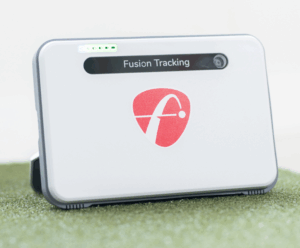
For those using one of FlightScope’s launch monitors for their indoor golf simulator set up, these latest improvements are going to make using the system that much easier. Whether you’re using the ever-popular and affordable Mevo or Mevo+ units, or the top-in-class X3 or X3C models, the upgrades will be obvious and you’ll wonder how you ever got by without them.
 Let’s break down how the latest FS Golf app update will benefit your practice — and, ultimately, your on-course performance.
Custom Club Colors & Smart Trajectory View
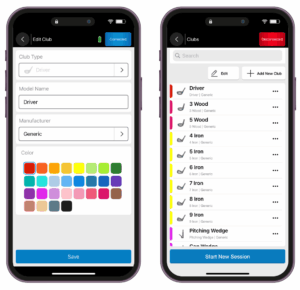
With the ability to assign a custom club color of the shot trace of every club in the bag, charting your shot patterns and comparing your great shots to the bad ones is so much easier. With a palette of 28 color options, you can assign each club its own hue. These colors aren’t just cosmetic — they now automatically appear in the trajectory view, giving instant visual confirmation of which club was used on a given shot. It’s a subtle upgrade but one you’ll likely use often since it improves both usability and visual clarity, especially during data review sessions.
Coaches and club fitters will especially appreciate how easily this feature organizes shot data by club.
Streamlined Wi-Fi Mode: Stay Connected, With No More Hassle
One of the most convenient new features is Streamlined Wi-Fi Mode. Previously, using your FlightScope device meant disconnecting from your home or facility’s Wi-Fi — a bit cumbersome if you also wanted to use online apps or gaming modes.
Now, you don’t have to choose.
The updated app allows users to stay simultaneously connected to their radar and the internet, eliminating the need to toggle between networks. Whether you’re uploading session data, streaming music, or connecting with FlightScope’s online gaming experiences, everything works smoothly — with no extra cables or adapters required.
 Enhanced Augmented Reality (AR) Tracer on a Single Device
If you watch enough professional golf on TV or YouTube golf, you’ve probably enjoyed shot tracing technology to the point that, like most of us, you almost take it totally for granted. FlightScope’s AR Tracer — which instantly overlays a live trajectory line on video of your shot, making every shot trackable like a TOUR player’s — has long been a favorite among tech-savvy golfers. But previously, it required a second iOS device to function.
With the latest update, however, the AR Tracer now runs on a single iOS device, simplifying the process greatly. Whether you’re analyzing your swing solo on the range, capturing content for your instructor or a social media post, you’ll appreciate the streamlined workflow and reduced setup time.
This update represents FlightScope’s ongoing dedication to making golf technology more accessible, intuitive, and valuable for users. These features offer better control, better insight, and more flexibility during the time you’re using FlightScope’s technology.
FlightScope’s FS Golf app is available now for download and update via the Apple App Store and Google Play. For those already using FlightScope’s Mevo, Mevo+ or X3 devices, this quiet upgrade means a giant leap in ease of use — and for newcomers, these upgrades are one more reason to give radar-based performance tracking a serious look.
To find the FlightScope launch monitor solution that’s right for you, visit ShopIndoorGolf.com.